Latest update: September 25, 2026 - 10 min read
Everlance vs Driversnote: Which Mileage Tracking App to Choose in 2026
Where should your business miles live: a money app or a mileage app?
Everlance and Driversnote both track your drives automatically and turn them into a mileage log you can hand to the IRS, your accountant, or your employer. The difference is how much else each app wants to do for you.
Everlance wants to hold your mileage, expenses, income, and tax filing in one app. Driversnote keeps the mileage log and nothing else, and goes further on it: which car you drove, which business the trip was for, and which rate applies.
This comparison sets the two side by side on features, tracking, vehicles, IRS record-keeping, privacy, and price, including what Everlance’s free plan covers. By the end, you’ll know whether you need an all-in-one money app or a dedicated, precise mileage log.
TL;DR: one app runs your 1099 paperwork, one runs your mileage log
Everlance suits drivers who want miles, expenses and taxes in one app. Driversnote suits drivers whose accountant or employer handles the rest, and who need the log right for every car and mileage rate.
Everlance tracks trips with your phone’s GPS, and you swipe each one as work or personal. Paid plans add expense and income tracking, bank sync and tax filing. Its free Basic plan detects up to 30 trips a month automatically. Everlance is owned by Motus.
Driversnote tracks trips with your phone, or with an optional iBeacon device in your car. It sorts trips by your work hours, keeps a separate log and rate for each business, and exports PDF and Excel reports on every plan. You can log 15 trips a month for free.
Everlance vs Driversnote feature by feature
| Driversnote | Everlance | |
|---|---|---|
| Best for | Drivers who need an accurate mileage log and handle expenses elsewhere | Self-employed drivers who want mileage, expenses and taxes in one app |
| Automatic tracking | Phone GPS, can be combined with the iBeacon | Phone GPS, from about 5 mph |
| Knows which vehicle | Yes, with the iBeacon | No, you assign each trip |
| Classification | Inbox review, trip splitting | Swipe left or right, Favorite Trips rules |
| Work-hours rules | All plans | Starter and Professional |
| Mileage rates | IRS rate by trip date, or a custom rate per workplace | IRS rate by trip date, or one custom rate for all trips |
| More than one business | A workplace per business, each with its own rate | Exports filter by business line |
| Expenses, income, receipts | Trip notes only | Manual entry and receipt photos on all plans |
| Tax filing | No | TaxSlayer, on Professional |
| Report formats | PDF and Excel on all plans | CSV on Basic; PDF, Excel and CSV on paid plans |
| Free plan | 15 trips a month | Up to 30 automatic trips a month, plus unlimited manual trips |
| Ratings | US App Store 4.8 (39K); G2 4.6 (25 reviews) | US App Store 4.8 (52K); G2 4.4 (133 reviews) |
How much of your paperwork do you want in one app?
Everlance
Best for:
- Self-employed and gig drivers without an accountant who want everything in one place
- Anyone who’ll use bank and card sync to spot deductible expenses
- Drivers who want more free automatic trips while they try an app out
- People who like to call support, including on weekends
Driversnote
Perfect for:
- Drivers with an accountant who need a clean log to hand over
- Employees reimbursed for driving their own car, who don’t need expense or tax tools
- Anyone with two cars, a company car, or one car they want tracked on its own
- Anyone who drives for more than one business or claims at more than one rate
How do trips get recorded and sorted?
Everlance records with GPS and waits for your swipe
Everlance starts recording in the background once your phone detects motion at around 5 mph. Each trip arrives as a card: swipe right for work, left for personal. One G2 reviewer likes that you can classify trips “as personal or work in just a swipe.” Favorite Trips sorts your regular routes for you, and work-hours rules come with the paid Starter plan.
Driversnote sorts by work hours, with an optional in-car iBeacon
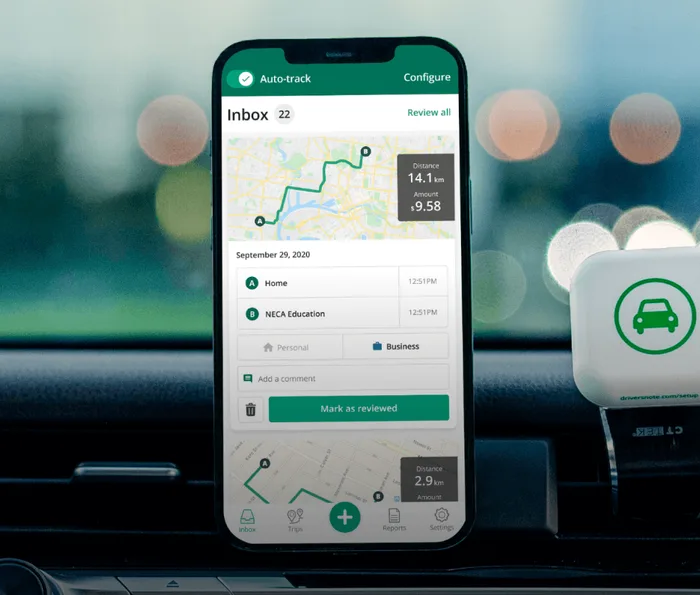
Driversnote tracks with your phone’s motion sensors, or with the iBeacon, a small Bluetooth device that stays in your car and tells the app when you’re driving it. On any plan, you can set your work hours, and the app marks trips made during them as business automatically. All trips wait in the inbox for a quick review, and you can split a drive that was half business and half errands.
What you’ll find in both
Both let you start trips manually, add the ones you missed by hand later on, add notes and custom purposes, and use a web dashboard.
The feel differs: G2 reviewers tag Driversnote as simple, and Everlance’s tagged cons include a complex interface. Day to day, the difference is how much sorting is done before you open the app.
Driving more than one vehicle
If you drive more than one vehicle, this is the biggest practical difference. Everlance’s help center puts it plainly: “the Everlance app cannot detect which vehicle you’re driving.” If you use multiple vehicles, for example as a fleet driver, you’ll need to assign the right vehicle to each trip by hand, in the app.
The Driversnote iBeacon stays in one car and only records trips in that car. Bus rides and journeys as a passenger stay out of the log, so a company car and your own can each keep a clean record. Without the iBeacon, phone tracking works in any vehicle, and you choose the vehicle per trip, as you would in Everlance.
The iBeacon comes free with an annual subscription.
What do you gain, and give up, with an all-in-one app?
Everlance does more than log miles
Every plan lets you record expenses and income and attach receipt photos.
The Professional plan additionally syncs your bank and cards and adds tax filing through TaxSlayer and audit defense. Exports filter by business line, such as DoorDash or real estate. On G2, Everlance scores well ahead on expenses and reimbursement, and a five-year user sums it up: “I am able to keep track of my mileage and expenses for my business.”
That matters even on the standard mileage rate. For US drivers, IRS Publication 463 lets you deduct “business-related tolls and parking” on top of it, so those receipts need a home. If you want all of it in one app, Everlance might be a better fit.
However, that also means having more to learn. The learning curve G2 reviewers flag comes with the extra features.
Some of the other disadvantages include:
- The log basics cost extra. Work-hours classification and PDF reports start on Starter, and the free plan exports CSV only.
- More of your data. Expense sync needs your account balances and transaction history.
- A card up front. The Starter trial needs a card, and Everlance states that “all sales are non-refundable.”
Driversnote does one job
Every plan, free included, has work schedules, PDF and Excel reports, custom rates, and a separate workplace for each business, each with its own rate. Expenses stay with your accountant, your bookkeeping software or your employer. In the US, Driversnote partners with Wave for accounting.
Does each app meet IRS mileage log requirements?
Yes, both do. For US drivers, IRS Publication 463 states that an accurate mileage log must contain the date, total mileage, destination, and business purpose of each trip, recorded “at or near the time,” and counts a weekly log as timely. Both apps capture those fields as you drive. For every field and edge case, see what the IRS expects in a mileage log.
The differences are in the report. Everlance’s free plan exports CSV, with PDF on paid plans. Driversnote exports PDF and Excel on every plan, listing the date, start and end points, purpose, distance, rate and amount for each trip. A G2 reviewer says Driversnote “provides great proof for my taxes in my training business.”
Handling of the mid-year IRS mileage rate increase
Both apps apply the IRS rate by trip date, so one 2026 report handles the mid-year change from 72.5 to 76 cents a mile on its own. The difference is custom rates. Everlance holds one, and it then applies to every trip in your account. Driversnote lets you set a different rate for each workplace, which helps if you drive for an employer at one rate and for your own business at another.
Who sees your location and your bank data?
Everlance’s pricing page says: “We do not sell or share your email or data with anybody.” Its App Store privacy label lists contact info, identifiers, and usage data under “Data Used to Track You,” and its privacy policy says your information is stored and processed in the United States. Expense sync collects your account balances and transaction history, and deleting your data means emailing support.
Driversnote’s App Store label lists no data used to track you. It does link your precise location and contact details to your account, because a mileage log needs them. Driversnote is a Danish company, it’s the data controller under GDPR, and its privacy policy says it doesn’t sell personal data.
More data buys more features. If a mileage log is all you need, you don’t have to make that trade.
Pricing
| Driversnote | Everlance | |
|---|---|---|
| Free plan | 15 trips a month, with every logging feature | Up to 30 automatic trips a month, unlimited manual trips, CSV export |
| Paid plans | Pro | Starter, Professional |
| Priced per | Driver, any number of vehicles | User |
| Billing | Monthly or yearly | Monthly or annually |
| Trial | Free plan | 7-day Starter trial, card required |
| Bundled extras | Free iBeacon with a yearly plan bought on the web | Tax filing and audit defense on Professional |
| Cancelling | Cancel before the next renewal | Set to cancel at least 7 days before renewal |
| Currency | USD | USD |
Is Everlance or Driversnote free?
Both apps have a free plan. Everlance offers 30 free trips a month (automatically logged) plus unlimited manual trips, and the paid Starter and Professional plans are billed monthly or annually. In the App Store, you’ll see them listed as Everlance Premium plans.
With Driversnote, you can track, log, and report 15 free trips per month. Use either one to test the tracking on a few weeks of your real trips before paying. Check today’s prices on Everlance’s pricing page and Driversnote’s pricing page.
Is there a version for teams and employers?
Yes, both apps offer a teams context. Everlance Business, now run under Motus, has a free team plan for up to five members, report approvals with auto-approve rules, and reimbursement programs such as fixed and variable rate (FAVR).
Driversnote Teams has report approvals, free accounts for managers, and licenses you can reassign as drivers come and go.
Which app to choose
Neither app is better across the board. The right one depends on who handles everything that isn’t mileage: you in an app, your accountant, bookkeeping software, or your employer.
Choose Everlance if:
- You want expenses, income and tax filing in the same app as your miles
- You don’t have an accountant or bookkeeping software
- You want more free automatic trips while you try it
Choose Driversnote if:
- You want a log that knows which car you’re in
- You want a simpler app with work hours, PDF reports, and separate business logs on every plan
- You’d rather not connect your bank to a mileage tracker
Tired of logging mileage by hand?
Effortless. IRS-compliant. Liberating.
 Auto-track trips
 Classify trips
 IRS compliant reports